
How to Use KundliGPT - Step by Step Guide
Welcome to KundliGPT! KundliGPT is an AI chatbot that reads your birth chart and answers your questions about your life and the planetary influences on it. It’s useful whether you follow astrology closely, are curious about what your chart says about you, or just want to try an AI chatbot.
This guide walks you through using the platform to get personalized horoscope recommendations.
Step 1: Visit KundliGPT
Visit our website by going to kundligpt.com.
Step 2: Click on “Chat Now” Button
Once you’re on the website, locate the “Chat Now” button and click on it to initiate the interaction with KundliGPT.
You can pick the language you prefer. These are the languages we offer:

Step 3: Chatbot Guided Steps
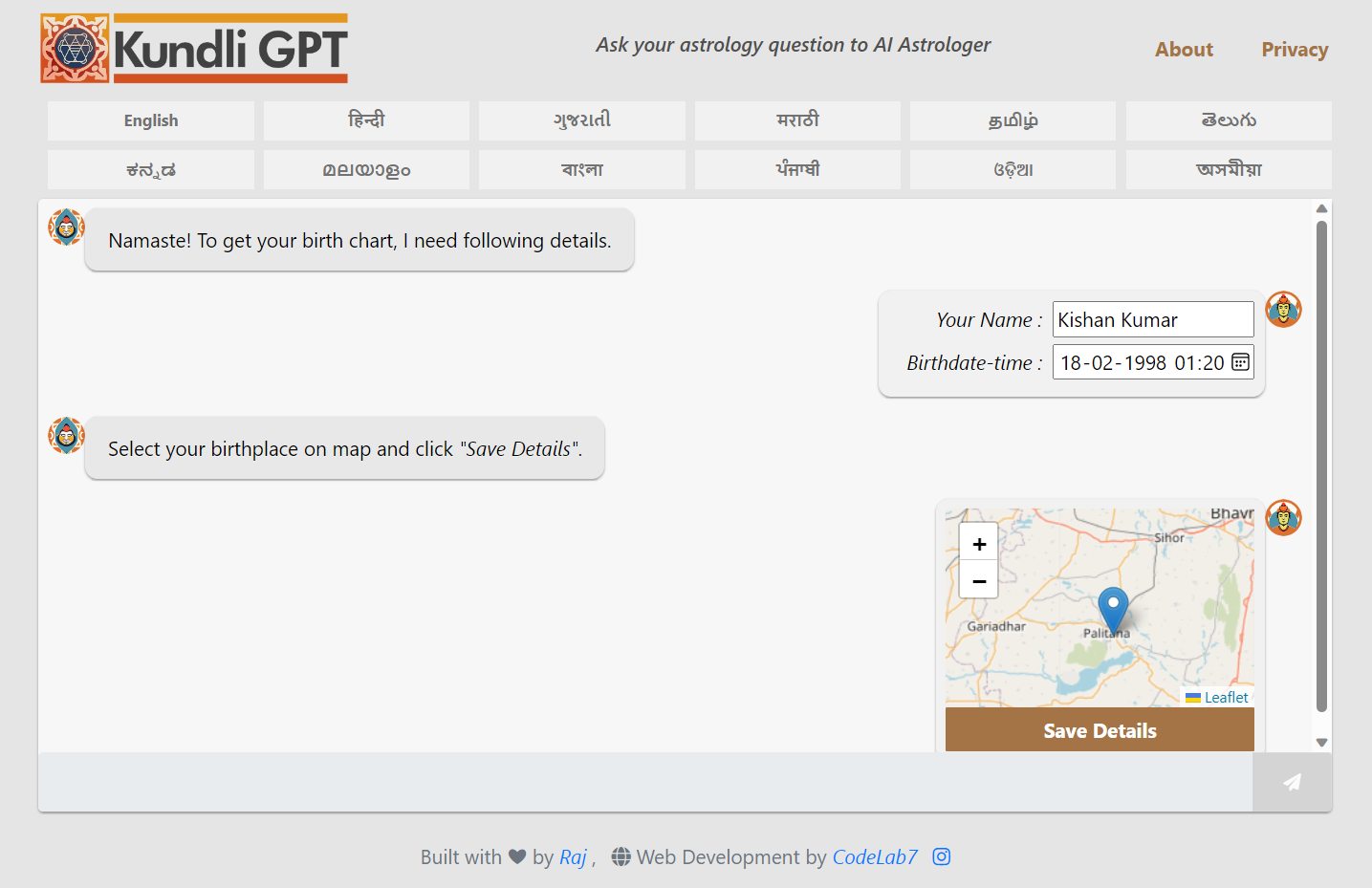
Follow the instructions provided by the chatbot. The chatbot will lead you through the process, similar to the screenshot shown below:
-
Provide Personal Details: You will be asked to provide your full name, birth date, and precise time of birth.
-
Pick Birthplace on Map: You’ll need to pick your birthplace on the map accurately.
-
Save Details: After entering all necessary information, select “Save Details” to inform KundliGPT that it has all the required data.
Step 4: Kundli Generates
After you save your details, KundliGPT generates your kundli and the AI analyses it.
Step 5: Ask a Question
You have two options:
-
Choose from Pre-made Questions: Pick one from the list of ready-made questions KundliGPT shows you.
-
Submit Your Own Question: Type your own question and send it.
Step 6: Receive Horoscope-based Recommendation
Once you submit your question by pressing the “send” symbol, KundliGPT gives you a personalized recommendation based on your horoscope.
That’s all there is to it. If you have questions or run into any problems, contact our support team.